Squad voice rooms
Start a room, invite your frenz and play. No setup, no server to build first.
Open a room, drop in with your frenz and play. Push-to-talk or open mic, noise suppression on by default and screen share with audio, all in the browser. Voice lives next to your feed and your clips instead of in a separate app.
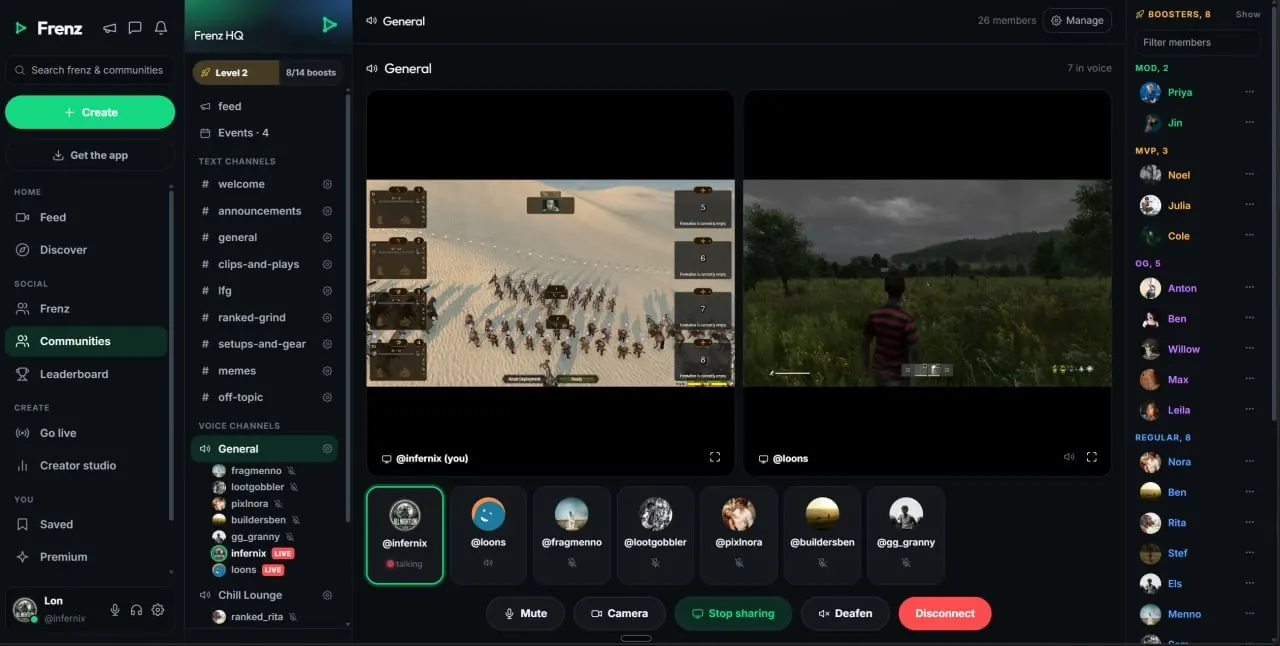
Frenz gives your squad free voice rooms and community voice channels in the browser. Push-to-talk or open mic, noise suppression on by default, per-person volume, device pickers, screen share with audio and cameras. The call keeps running while you scroll your feed, watch clips and check DMs.Product facts reviewed July 18, 2026
Two ways to talk
Spin up a room with your frenz for tonight, or give the whole community a channel that is always there. Both are free.
Start a room, invite your frenz and play. No setup, no server to build first.
Give the crew a channel that is always open, next to its text channels and shared feed.
Hold a key to talk or leave the mic open. Pick what fits the game and switch whenever.
Show your run and let the squad hear the game as well as see it.
Turn on a camera when you want faces in the call. Same room, no extra link.
Sound you control
The defaults do the work. Noise suppression is already on, per-person volume is one click and the device pickers use whichever mic and headset you plug in.
Noise suppression is on from your first call. Nothing to configure and nothing to install.
Per-person volume changes what you hear, not what the room hears.
Not a separate app
Voice is part of Frenz, not an extra window. The room keeps running while you scroll, post and reply.
Join a voice room and keep moving. Everything below works while you talk, in the same tab.
Clips and videos from the people you follow.
It shows on their profiles too and reaches their followers.
Reply, browse channels, then get back to the game.
Talk, play, clip, post. Everything in this list lives next to the call.
A clear comparison
Most squads juggle the game, a voice app and a place to post clips. Our goal is to fold the last two into one place that feels simpler than running both.
About a minute
No install for voice. The browser is enough, and phones use the mobile web app.
Sign up free at frenz.gg. It runs in the browser.
Find your squad and build your frenz list.
Start a room, pick push-to-talk or open mic and invite the squad.
Clip the play and tag the squad in it. The clip shows on their profiles too.
Voice on Frenz
Direct answers about price, browsers, push-to-talk, noise and what keeps running during a call.
Yes. Squad voice rooms and community voice channels are free, including screen share with audio and cameras. Frenz itself is free to use too.
No. Frenz voice works in the browser. Open the room, pick your mic and headset in the device pickers and talk. Phones use the mobile web app.
Yes. Use push-to-talk when you want the mic open only while you hold a key, or open mic when you want to talk hands free. Switch whenever you like.
Yes. Noise suppression is on by default, so keyboard clatter and background sounds stay out of the call and your squad hears your voice.
Set a volume for each person in the call. Turn a loud teammate down for yourself without changing what anyone else hears.
Yes. Screen share carries audio, so the squad hears the game as well as sees it, and cameras work in the same call.
Yes. The call keeps running while you scroll your feed, watch clips, check DMs or post. Voice sits next to the rest of Frenz instead of in a separate app.
A squad voice room is a quick call with your frenz. A community voice channel lives inside a community next to its text channels and shared feed, so members can drop in any time.
Related Frenz guides
The call is the start. Here is what sits around it.
Free voice chat
Open a room, drop in and play. The clips can come later.